I’ll show you how to shape a myAudi route around traffic and your priorities before you set off.
Mateo IrvingReviewer · published Nov 2, 2026 · 6 min read
01Start with the destination, not the departure
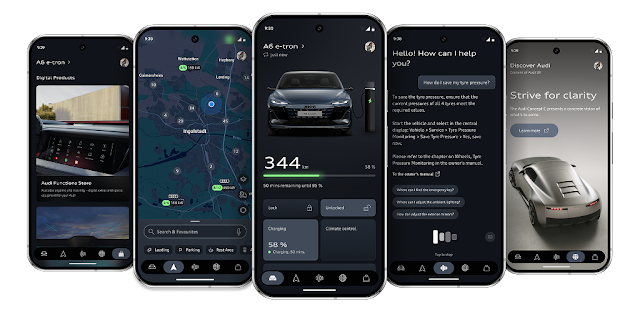
You’re in the car park, one hand on your phone, and the address is buried in a message. I’d use myAudi’s route planner to get the destination in place before worrying about which route to take. The app’s route planning is designed to help you plan efficient or preferred routes, with real-time traffic taken into account.
Open myAudi and select the vehicle you’re planning to use if the app asks. Look for the route-planning control, then enter the destination you actually need: a street address, venue, or saved place if one is available. Check the displayed result against your message or calendar before moving on; a familiar venue name can point to the wrong branch.
I make this a separate task from getting ready to drive. As a youth sports coach, I often need to turn a practice location into a workable trip between other commitments. Setting the destination first leaves room to check the route calmly, rather than making a choice while everyone is waiting in the car.
02Build the route in six taps
Open myAudi and select your Audi, if prompted.
Tap the route planner control.
Tap the destination field.
Enter the address or place name.
Choose the matching destination result.
Review the route options shown.
Treat those steps as a planning sequence, not a promise that every screen looks identical. The available controls can vary with the vehicle and app setup. The important check is that the selected destination matches the place you intend to reach, and that the route shown is the one you want to consider. If the result is ambiguous, refine the search rather than choosing the first match.
Before you act on a route, compare its endpoint with the destination details you started from. I’d do this especially for sports venues, campuses, and large sites, where a map pin can land at a different entrance. A correct route begins with a correct destination; traffic-aware planning cannot fix a mistaken address.
A route that looks shortest is not automatically the one that suits your day. myAudi describes options for efficient routes and routes based on your preference, so I’d make that choice deliberately. If you’re heading somewhere new, efficiency may be your priority; if you already know the roads, a familiar option may feel easier to follow.
Check the route choices the planner presents and read the distinctions before selecting one. Give real-time traffic a moment in your decision: a normally convenient road may be slow, while a different route could be more practical today. I wouldn’t treat a displayed route as a guarantee of arrival time; conditions can change after planning.
For a recurring trip, think about what makes the route useful to you. Is it a simple approach to the venue, a preference for efficient travel, or avoiding a road you find confusing? Keep that reason in mind when comparing the available options. It turns route selection into a choice you can explain, rather than a reflexive tap.
04Check traffic before the car moves
Route planning is most useful before the first turn. Once you’ve chosen a destination and reviewed the options, check the traffic information presented with the route. If the app offers a different route in response, compare it with your original choice instead of switching automatically. I’d favor the route I can follow confidently, especially when I’m coordinating a pickup or arriving at a fixed start time.
Weather alerts can also affect the practical side of a drive, even when they are not part of route planning itself. Check your usual local weather source before a longer trip in poor conditions, then allow extra flexibility. The planner’s traffic view is one input, not a substitute for paying attention to conditions around you.
If the drive involves equipment or a full car, make the route check part of your broader car maintenance and pre-trip routine: confirm the destination, review traffic, and make sure the vehicle is ready. I keep those checks separate so I don’t confuse a convenient route with a ready-to-go car.
05Add a stop without losing the main plan
A drive to practice may include a pickup or a quick stop on the way. First decide whether that stop changes the route you need, then check whether the planner provides a way to add it. The app description highlights route planning, but the exact planning controls can depend on the screen and setup in front of you. Keep the main destination clear while you explore.
If you see an option to add a stop, enter the stop and confirm that the final destination remains correct. Review the resulting route from start to finish before relying on it. If no suitable stop control appears, plan that leg separately rather than assuming the app has included it. This is a useful rule for any moving checklist too: make each destination explicit.
Don’t handle route edits while driving. Pull over safely before changing a destination or comparing options. A route is only helpful if you can follow it without splitting attention between the road and the phone.
06Make the final check part of your routine
Before leaving, reopen the planned route and verify the destination, the selected route, and the traffic picture. If a teammate or family member is meeting you there, confirm the location with them too. This quick review catches the kind of small address mismatch that can turn a straightforward trip into a search around the wrong entrance.
myAudi also describes remote vehicle functions and, for supported vehicles, easier preconditioning and charging planning. Those are separate from choosing a route, so I’d finish the navigation decision first and then check whichever vehicle controls apply to my Audi. Keeping each task distinct makes the app easier to use when the departure window is tight.
For the next trip, start by entering the destination early, then compare the route options with your priorities and current traffic. That’s the practical value of the planner: it gives you a chance to make the travel choice before the car is moving.
The takeaway
Start with the exact destination, then review myAudi’s route choices and traffic before setting off. A careful destination check is the fastest way to avoid planning around the wrong place.
Keep reading on this site’s myAudi page for more practical help with the app’s vehicle and route features.
 Best picksMy Location

 TipsCurrency converter offline
 TroubleshootingCode Studio
 CompareForeca Weather & Radar

 TroubleshootingPolice Radar

 How-toRemote Control for Rоku &

 TipsInvitation Maker
 CompareGps Map Navigation &

 TipsGmail
 How-toThe Official MTA App

 Tipsearnify