Foreca Weather & Radar vs Weather Forecast for Rainy Practice
I compare the forecast screens, radar and widgets so you can pick a weather app before the next rain check.
Mateo IrvingReviewer · published Oct 31, 2026 · 6 min read
01The five-minute rain decision before practice
At 4:20, with cones in the car and dark clouds over the field, I want two answers: when rain starts and whether it clears before practice ends. Foreca Weather & Radar and Weather Forecast - Live Radar both aim at that quick local check, but they get there with different priorities.
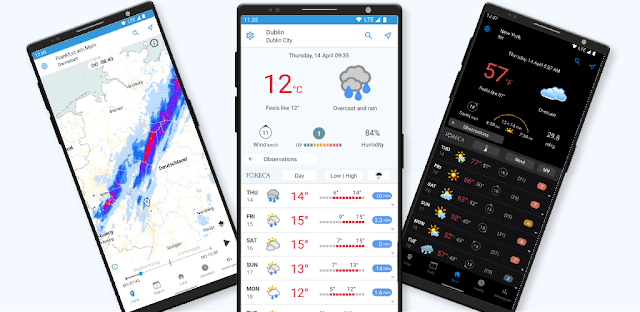
Foreca puts its case around accuracy, a clean layout and control over what appears on screen. Its listing also highlights radar with a near-term forecast and governmental weather alerts, which makes it the more purpose-built choice when a shower could change an outdoor plan.
Weather Forecast - Live Radar leads with local conditions, live information, radar and widgets. That is a sensible package for someone who wants the current weather on a home screen first, then opens the app only when the sky starts looking questionable. The rest comes down to how much control you want.
Foreca Weather & Radar and Weather Forecast - Live Radar on the checks that shape a daily choice.
02Forecast detail: Foreca wins for a tailored daily view
I would choose Foreca if the standard temperature-and-icon view is not enough. The app is built around customizable views, letting you choose weather parameters and hide the ones that do not help your routine. That matters when wind, rain timing or a winter condition deserves more attention than a generic forecast card.
This flexibility is useful for home improvement jobs too. If I am choosing a dry window for paint, yard work or a weekend repair, I want a screen arranged around rain, wind and the day ahead rather than a crowded pile of details I will ignore.
Weather Forecast - Live Radar is the simpler bet for a straightforward local forecast. Its store summary points to live weather information anytime and anywhere, so I would start there if my main habit is checking current conditions before leaving home. Foreca is the stronger pick when you want to shape the information around the decision.
03Radar and weather alerts: choose the screen you will open fast
Radar is where both apps meet the urgent use case: rain is approaching, and a static daily forecast is no longer enough. Weather Forecast - Live Radar puts live radar directly in its name, so it is the natural candidate for users who mainly want a visual check of what is nearby.
Foreca goes further in the features described on its Google Play page, with radar forecast for the next few hours alongside governmental weather warnings. That combination gives it the edge for planning a session, a commute or an outdoor event where the direction of the weather matters as much as what is overhead now.
For weather alerts, I would keep the choice practical. Open each app after installation, select your location, and look for the warning and notification controls in settings. Foreca’s current weather notification also has status-bar temperature handling, so it suits people who like a small at-a-glance readout without opening the full forecast.
04Widgets and the lock-screen habit favor Weather Forecast
A widget should answer a question before you tap anything: is it cold, wet, windy or calm enough for the plan? Weather Forecast - Live Radar specifically calls out widgets, making it the clearer starting point for a home-screen-first setup on an Android phone.
That can be useful alongside a smart thermostat routine. A quick look at outside conditions before the morning rush helps you decide whether to adjust the house plan, grab extra layers or expect wet shoes at the door. I would look for a widget size that keeps the essentials readable rather than filling every spare square.
Foreca can still work well as the app you open for a deeper check. Its appeal is the ability to decide which parameters matter in the app itself. If widgets are your deciding feature, Weather Forecast has the cleaner stated advantage; if configurable forecast screens matter more, Foreca pulls ahead.
05Cleaner setup or more control: the trade-off that matters
Foreca’s strongest promise is that its interface can be both clean and highly customizable. Those goals can clash in weather apps: extra details are useful until every screen feels like a control panel. The sensible setup is to keep daily essentials visible, then add seasonal details only when they affect your plans.
I would start Foreca with one saved location, current conditions, the hourly outlook and radar. Then I would add wind or other relevant parameters when outdoor work returns. This is also handy for a moving checklist: check the destination, the route area and the day you need boxes and furniture to stay dry.
Weather Forecast - Live Radar looks better suited to people who do not want to tune much. Open it for local conditions, use the widget if it fits your phone, and turn to radar when needed. That lighter routine is valuable when weather is only one small part of a busy morning, not a hobby.
06My pick: Foreca for decisions, Weather Forecast for a glance
Pick Foreca Weather & Radar if rain timing, warnings and a tailored forecast screen can change what you do next. I think it is the better fit for outdoor schedules, home security checks before a storm, seasonal chores and anyone who gets frustrated when a weather app forces irrelevant information into view.
Pick Weather Forecast - Live Radar if you want local weather and a widget-led routine with live radar close at hand. It is the more direct choice for someone who wants to see conditions from the home screen, then make a quick call without spending time rearranging forecast details.
Neither choice needs a complicated first setup. Add your main location, check that the temperature units make sense, and compare the radar screen during the next unsettled spell. The app that gets you from clouds to a clear plan with fewer taps is the one worth keeping.
The takeaway
Start with Foreca Weather & Radar if you need radar forecasts, weather alerts and control over the forecast details; choose Weather Forecast - Live Radar when widgets and a quick local glance are your priority.
Continue to our Foreca Weather & Radar page just below for a closer look at its screens and settings.
The Considered Pick is independent and not affiliated with Foreca. This guide reflects the reviewer's own setup; menus can differ by device and version.
 Best picksMy Location
 TipsCurrency converter offline
 TroubleshootingCode Studio
 How-tomyAudi
 TroubleshootingPolice Radar
 How-toRemote Control for Rоku &

 TipsInvitation Maker
 CompareGps Map Navigation &

 TipsGmail
 How-toThe Official MTA App
 Tipsearnify