I’ll show you how to set up pickup, delivery and rewards before hunger turns a small ordering mistake into a longer wait.
Mateo IrvingReviewer · published Oct 25, 2026 · 6 min read
011. Pick the location before building your order
You’re trying to order breakfast between errands, and the first menu you see looks right—until you realize it belongs to a different Denny’s. Start with Find and order from your local Denny’s, choose the location that suits your route, then browse its menu. That small order of operations helps keep the rest of checkout tied to the diner you actually plan to visit.
I make this check before choosing pickup or food delivery, especially when my day includes practice at a different field. A saved favorite is handy, but it still needs the right location and fulfillment choice for this order. Confirm both before you add items; it’s easier to correct the plan while the basket is empty than at the final checkout screen.
022. Use “for later” to plan around a real departure time
If you know you’ll leave work, school or the field at a particular time, choose the app’s “for later” option instead of ordering “for now” by reflex. Set the order around when you expect to arrive, not when you happen to open the app. That makes the ordering step part of your plan rather than one more task competing with getting everyone out the door.
I schedule youth practices, so I think in arrival windows: pickup after practice is different from delivery to a home where the team is gathering. Check the selected timing and fulfillment option before you continue. If your schedule shifts, revisit those choices before paying rather than assuming an earlier selection still fits. The next useful check is what you’re ordering repeatedly.
033. Save a favorite for the order you actually repeat
Use the app’s save-favorite-order option after you’ve settled on a combination you genuinely want again. It’s most useful for a familiar takeout order when you’re hungry and don’t want to rebuild every choice from scratch. Treat the saved order as a shortcut, not as a finished checkout: open it, look over the items, and confirm the location, timing and pickup or delivery choice.
This is also a practical way to keep a usual group order from turning into a string of menu searches. I’d save a reliable order only after checking that it reflects what I mean to repeat, then review it each time before submitting. A favorite can speed up the start; the final screen still deserves a careful look, particularly when you’re ordering for more than yourself.
044. Check rewards before you reach the payment step
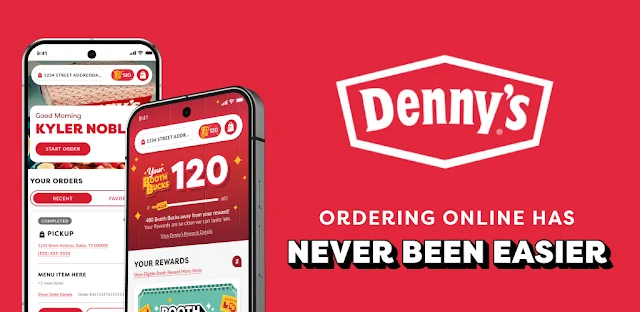
Sign up for Denny’s Rewards if you want the app’s member offers and challenges to be part of your ordering routine. Before checkout, look for an offer you can apply to the order you’re placing. The app supports applying offers during checkout, so checking earlier gives you a chance to compare the order with the reward instead of discovering the choice only after you’ve settled on everything.
I’d approach reward offers like meal deals: decide whether one fits the meal you already planned, rather than adding food just to chase a perk. The birthday Everyday Value Slam and Rewards Challenges are separate reasons to keep an eye on the program, but each offer has its own use in your order. Review the available option and apply the one that suits this visit.
055. Keep the QR scan for an in-store checkout
If you’re paying in the diner and have a coupon you earned, use the app’s QR-code scan during in-store checkout to redeem it. That is a different path from applying an offer to an order in the app. Keeping the two situations straight saves a last-minute scramble: use the checkout offer flow for an online order, and have the app ready to scan when you’re redeeming a coupon at the diner.
I’d open the app before the bill arrives if I know I’m planning to use a coupon. Find the relevant reward, then follow the in-store checkout prompts to scan its QR code. This is especially useful when a meal shifts from planned takeout to eating in; check which redemption route applies before you try to use the offer, rather than expecting an online checkout step to cover an in-person visit.
066. Check BoothBucks and communication choices deliberately
Denny’s Rewards members can collect BoothBucks, a newer member perk called out in the app’s recent changes. If you’re already using Rewards, check the app’s member area for the perk and make sure you understand the actions shown there before counting on it for a particular visit. I wouldn’t build an order around an assumed reward; I’d first confirm what the app presents for my account and this order.
The same changes include a communication-preference confirmation screen. When it appears, read the choice and confirm the preference you actually want, rather than tapping through while juggling the menu. That’s a useful moment to get your account settings in order before your next rush-hour takeout or delivery order. With location, timing and reward choices checked, the final order review becomes much simpler.
The takeaway
First, choose your Denny’s location and pickup or delivery plan, then check timing and applicable rewards before checkout. Save a favorite only after confirming it’s an order you’ll want to repeat.
For more practical Denny’s tips, keep reading the Considered Pick page just below.
The Considered Pick is independent and not affiliated with Denny's, Inc. This guide reflects the reviewer's own setup; menus can differ by device and version.

 Best picksMy Location
 TipsCurrency converter offline
 TroubleshootingCode Studio

 TipsInvitation Maker

 How-toRemote Control for Rоku &
 CompareGps Map Navigation &

 TipsGmail
 How-toThe Official MTA App
 Tipsearnify

 TipsCamera Translator

 How-toPixVerse