
You have ten minutes before leaving, and the route involves a subway transfer followed by a bus. I’d use that short window to check the service status, map the trip, then save the lines or stops I’ll need again. That little setup can make the next check quicker; the app’s value is less about one grand itinerary than having the right MTA details ready when plans shift.
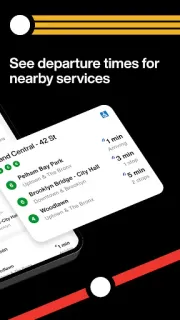
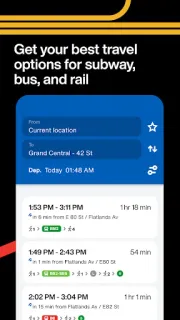
The app covers subways, buses, Long Island Rail Road and Metro-North. Its map-based trip planning puts routes in one place, while the Status tab offers a quick view of service issues. For a bus leg, you can follow the vehicle on the map. Save frequently used lines, stops and stations, opt into alerts for disruptions, or use personalized smart alerts for preferred trips. Interactive home-screen widgets show live departures and service status without opening the app.
The first few minutes are not entirely hands-off: you’ll need to find your usual routes and decide which stops or stations deserve saving. Alerts are optional, so consider whether notifications suit your routine; location access may also help with map-based travel features. Keep a backup route in mind when a disruption matters, and check the app’s live information before setting out rather than treating a planned trip as a guarantee. It is free to install, but mobile data use and any in-app purchase terms are worth checking on Google Play before you commit.
Install it if you regularly ride MTA services and want subway, bus and commuter-rail information close together. It’s also useful for occasional visitors who need one place to plan a multi-service trip, though the initial route-saving step may feel unnecessary for a one-off ride. If you travel outside the MTA network or prefer paper schedules, this app is unlikely to earn space on your phone. Check the Google Play button just below to confirm you’re opening the listing for the MTA app.

 How-toThe Official MTA App