
A team photo is ready, but the group chat needs something more lively than another still. PixVerse can turn an image into an animated clip, giving you a quick way to make a playful post or a surprise for friends. I’d keep notifications focused on useful activity rather than letting every creative nudge interrupt practice planning. Check Android’s app notification settings if alerts become noisy; the exact controls can vary by device.
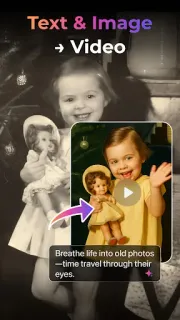
The core tools cover text-to-video and image-to-video creation, plus text-prompt edits to an existing AI video. You can extend a clip, guide its opening and closing frames, or combine up to three images in Fusion Mode. Templates and effects include old-photo animation and dance-style transformations. That makes PixVerse closer to a playful video editor than a full graphic design workspace: the appeal is generating motion, not arranging a detailed page layout. If you make clips often, decide which alerts help you return to a project and which can wait.
The listing flags ads and in-app purchases, so treat the free-to-install label as an entry point, not a promise that every option is included. AI video creation also depends on sending prompts or images through the app’s workflow, so choose photos you’re comfortable using for that purpose. Notifications are optional conveniences, not a reason to grant broad access: review Android’s app permissions and notification controls, and allow only what suits how you plan to use it. Before committing to a particular effect or workflow, check the Google Play listing for the current purchase details.
PixVerse suits people who enjoy experimenting with social clips, animating personal images, or trying prompt-led edits without learning a conventional editing timeline. I’d skip it if you want quiet, manual editing controls, need a dependable way to make polished work on a tight schedule, or don’t want ads and purchase prompts in a creative app. If you’re curious, check the developer and purchase details, then use the Google Play button just below to open the listing.


 How-toPixVerse