When practice plans are still on my phone at breakfast, a short prayer reminder could help me pause before the day takes over. Pray Daily is aimed at that kind of regular use, with daily prayer and Bible content in one place. I would keep notifications purposeful: allow a reminder only if the app offers a schedule that suits your routine, then use Android’s notification settings to quiet it when it becomes noise. That matters when your phone is already buzzing with team messages.
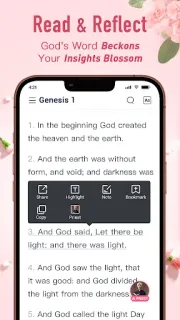
The app combines KJV Bible reading, daily prayer, personalized Bible study and AI-guided insights. Its description also highlights verse selections, reading customization, notes, passage highlights and Bible audio, including listening during a commute. Audio can suit wireless earbuds on a walk; for focused reading, notes and highlights give you a way to mark passages to revisit. The description says scripture can be available without an internet connection, which may help when you are away from a reliable connection. This is a devotional reading tool, not a news subscription or an audiobook catalog.
Pray Daily is free to install, but it contains ads and offers in-app purchases, so check the Google Play listing for the purchase details before you commit. Ads may interrupt a quiet reading session. Notification controls also deserve a quick look: Android lets you manage an app’s notifications, but the app’s own reminder choices depend on what it presents after you open it. Keep only the alerts that support your routine, and turn them off at the system level if they distract you. Its AI-guided feature is an additional tool, not a substitute for your own judgment or trusted spiritual guidance.
I’d consider installing it if you want KJV scripture, prayer prompts and study features together, especially if audio helps you make room for reading in a busy day. Skip it if ads are a deal-breaker, you want a Bible app without AI features, or you need a tightly specified reminder schedule before trying an app. To check the fit, open the Google Play listing just below and review the developer, purchase details and update notes before installing.